Welcome to the IC-CoDE Portal
An interactive website to apply the International Classification of Cognitive Disorders in Epilepsy (IC-CoDE)
Tutorial
Part 1: Individual Data Entry
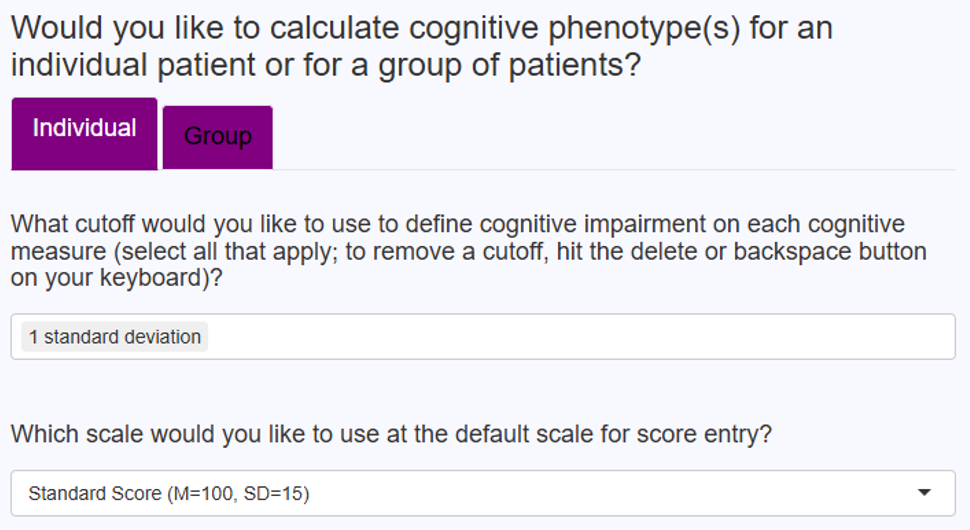
Step 1: Set Parameters
- Click the “Individual” tab
-
Cutoff Selection: Choose 1, 1.5, and/or 2 SD below the normative mean to define cognitive impairment.
- Tip: Remove any others that you are not interested in using.
-
Default Score Scale: Choose from:
- Standard score, scaled score, T-score, z-score, or percentile.
- Note: This is only the default — you can change it per test.
Step 2: Enter Cognitive Test Data
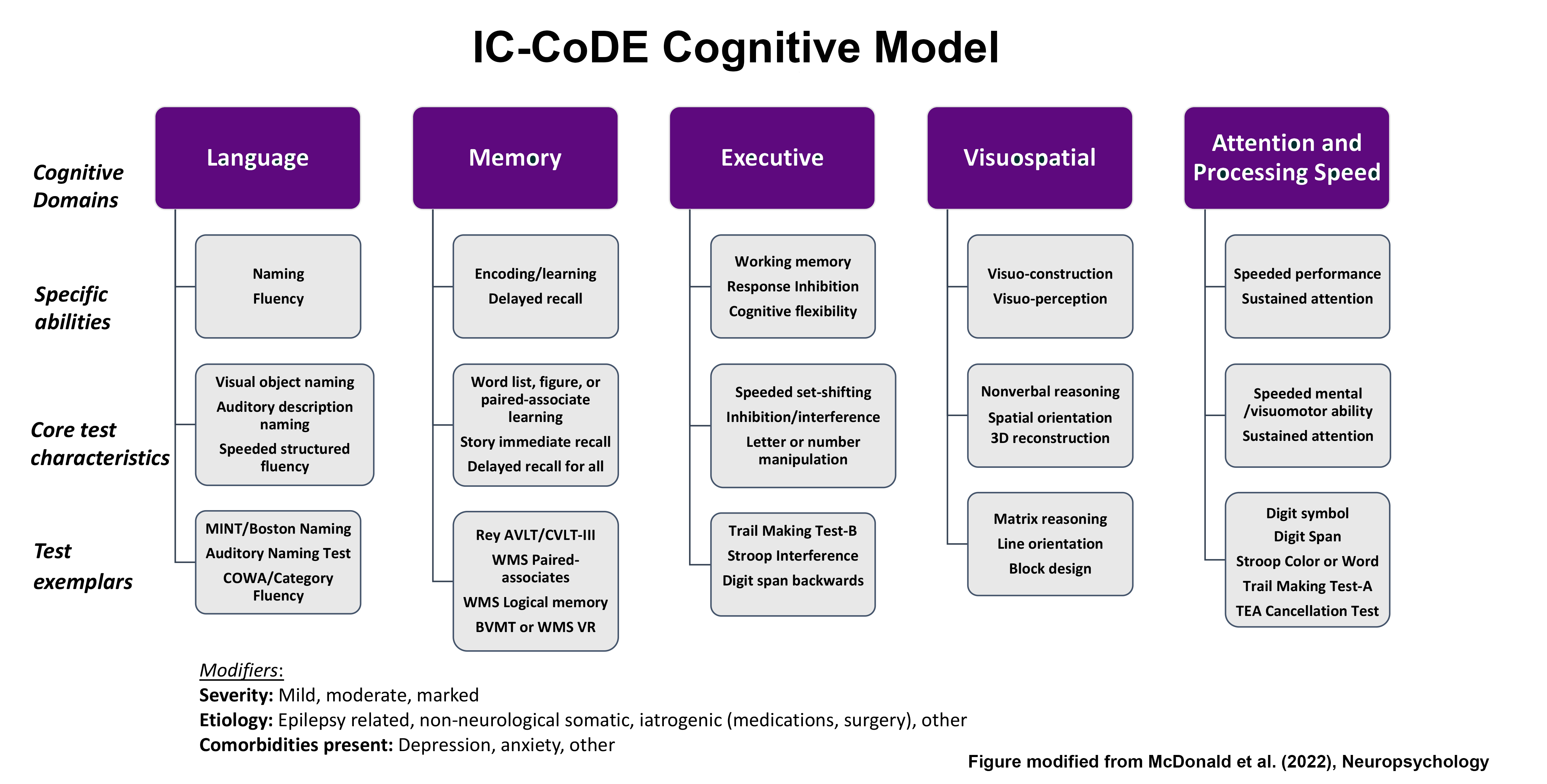
Cognitive domains include:
-
Language
- Subdomains: Naming, Fluency
- Example Tests: Boston Naming Test, Category Fluency, etc.
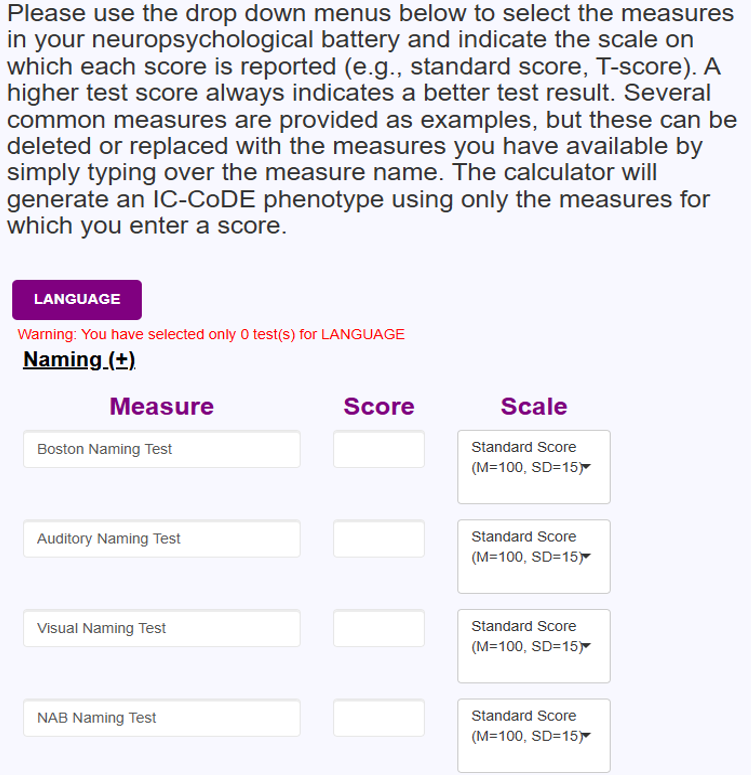
- Enter the test name, score, and scale on which the test score is provided for this and all other domains.
- Note: The test names provided are commonly used measures. If you do not use these measures, you may leave them blank or type over them to include the names of the tests you have available.
- Note: The specific test and test version used does not matter. The calculator will work for any test that you enter into the Measure field.
-
Memory
- Subdomains: Word List Recall, Story Recall, Word Pair Recall, Design Recall
- Example Tests: CVLT, Logical Memory, BVMT, etc.
- Tip: Make sure the score scale matches the data (e.g., T-score, z-score, scale score).
-
Executive Function
- Subdomains: Set-Shifting, Problem-Solving, Response Inhibition
- Example Tests: Trail Making Test Part B, WCST
- Tip: When possible, use scores from different measures within the same domain (e.g., Trail Making Test – Part B, WCST Perseverative Errors) rather than two scores from a single measure (e.g., WCST perseverative errors and conceptual level responses).
-
Attention/Processing Speed
- Subdomains: Attention, Processing Speed
- Example Tests: Digit Span, Trail Making Test Part A, Coding
- Tip: Make sure the score scale matches your source (e.g., scaled scores from WAIS subtests, T-scores from Trail Making Test).
-
Visuospatial
- Subdomains: Visuoconstruction, Visuoperception
- Example Tests: Block Design, Judgment of Line Orientation
- Tip: Adjust the scale type and include the relevant scores.
-
MOOD AND BEHAVIOR (Optional)
- Subdomains: Depression, Anxiety, Behavior
- Example Tests: BDI (Depression), BAI (Anxiety), CBCL (Behavior)
- Note: The mood and behavior inventories are not used in phenotype classification, but may be included as potential modifiers.
General Tip: It is recommended that users include tests of different types within a domain whenever possible (e.g., naming and fluency rather than two fluency tasks in the Language domain).
General Note: A small warning button may appear to the right of a test score to indicate that a score may have been entered incorrectly or the incorrect scale type selected. This is simply a prompt to check for errors; the calculator will still work if this warning button is present.
Step 3: Submit
- Scroll back up and review all entries.
- Make sure at least two tests per domain are included in at least four domains.
- Click "Submit Entries".
-
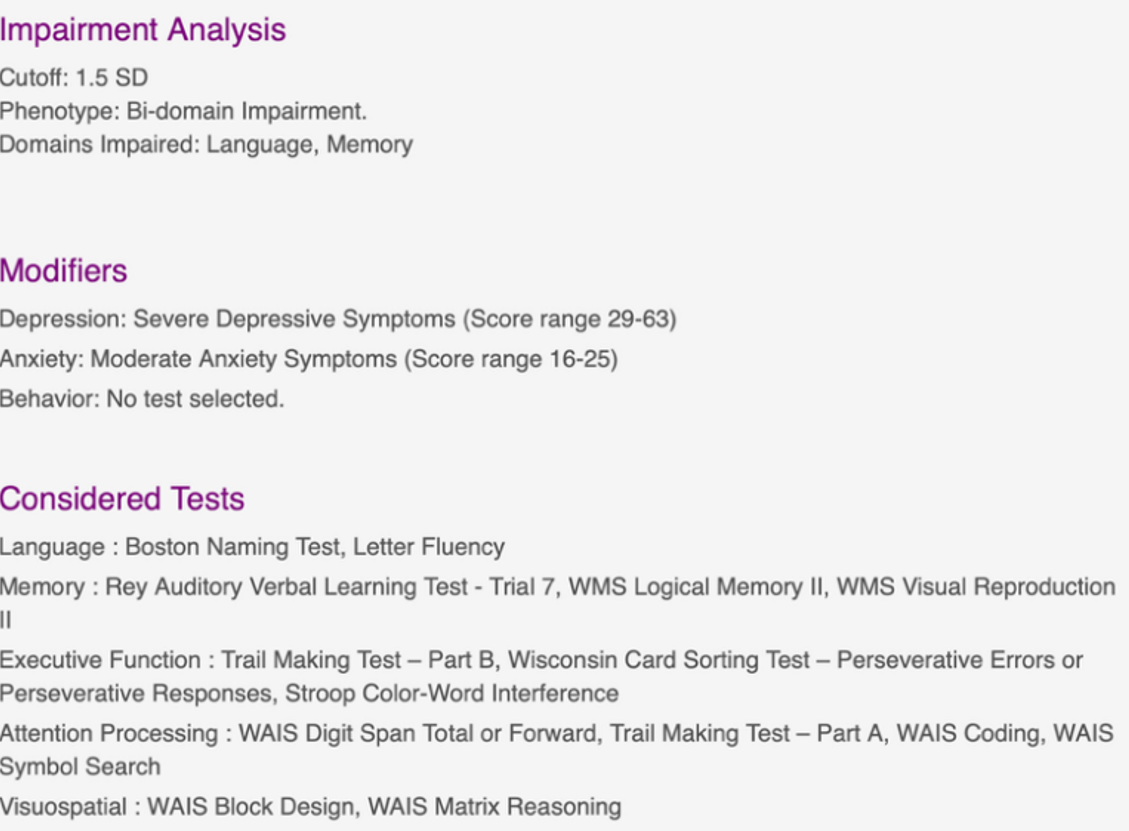
The IC Code system will display:
- Cutoff(s) used
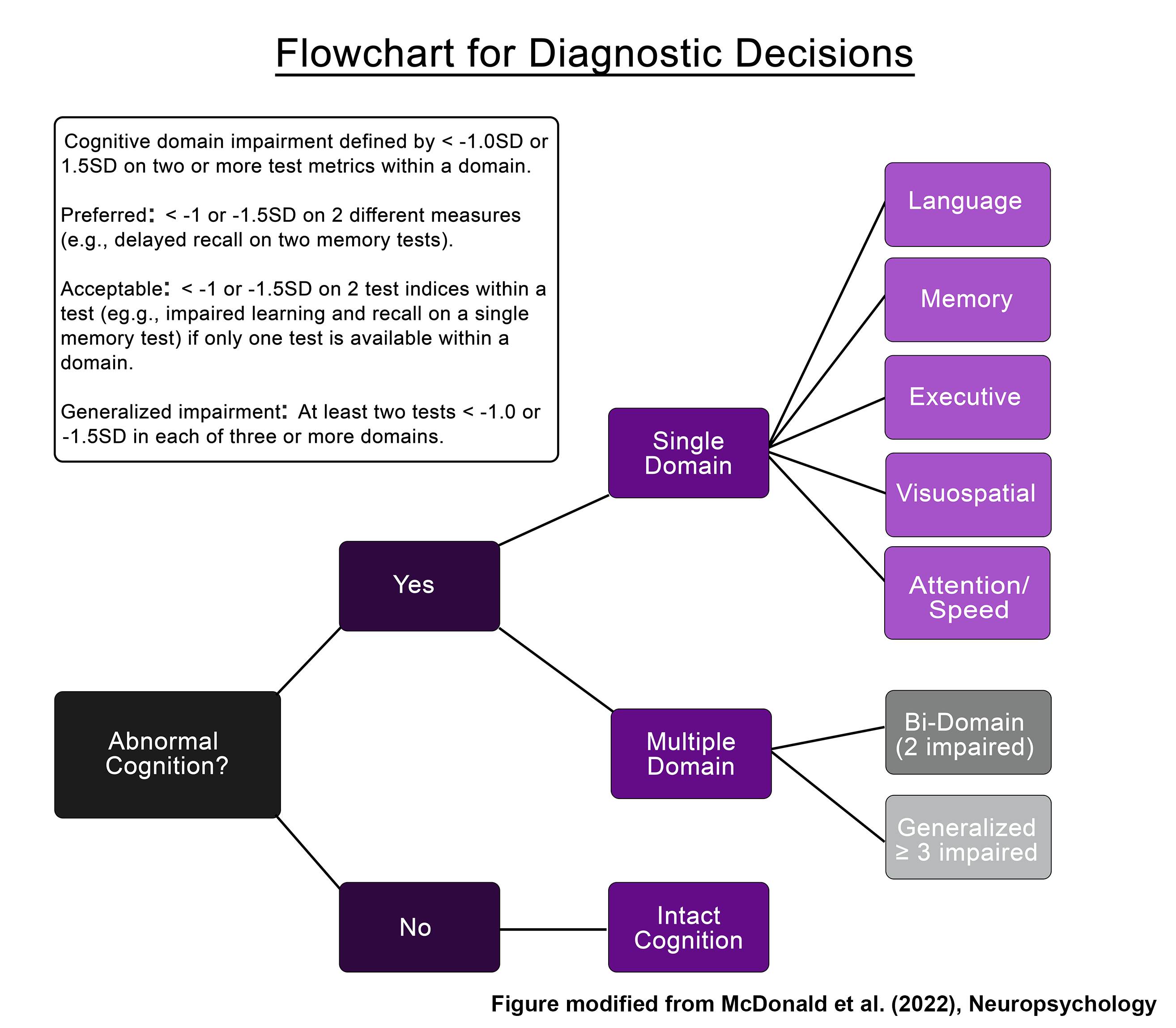
- Overall phenotype (e.g., Generalized, Bi-Domain Impairment)
- Domains impaired
- Any selected modifiers
- Tests included in the phenotype calculation
- You may download results or reset to enter a new patient/participant.
Individual Data Entry – Workflow Summary
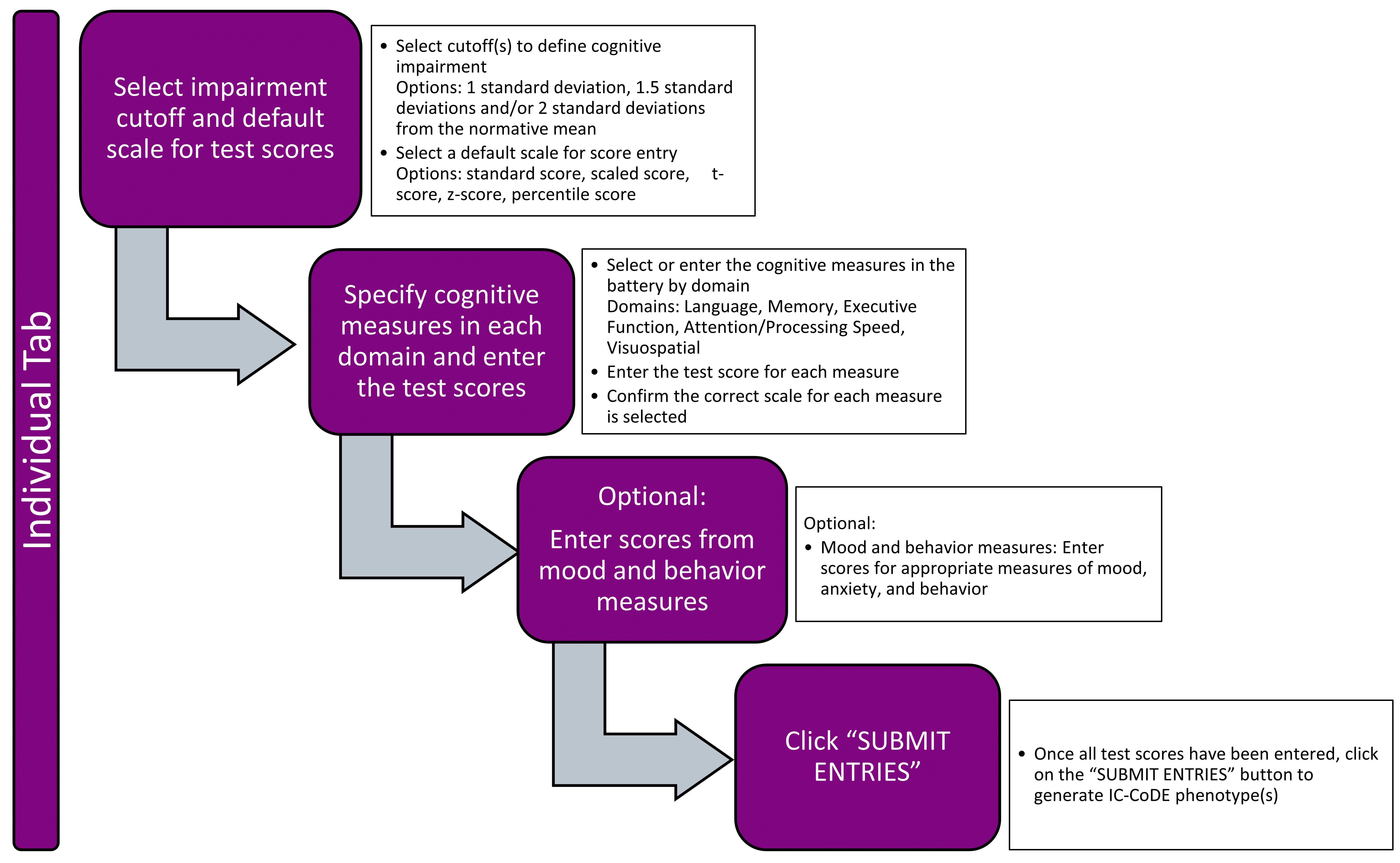
Part 2: Group Data Entry
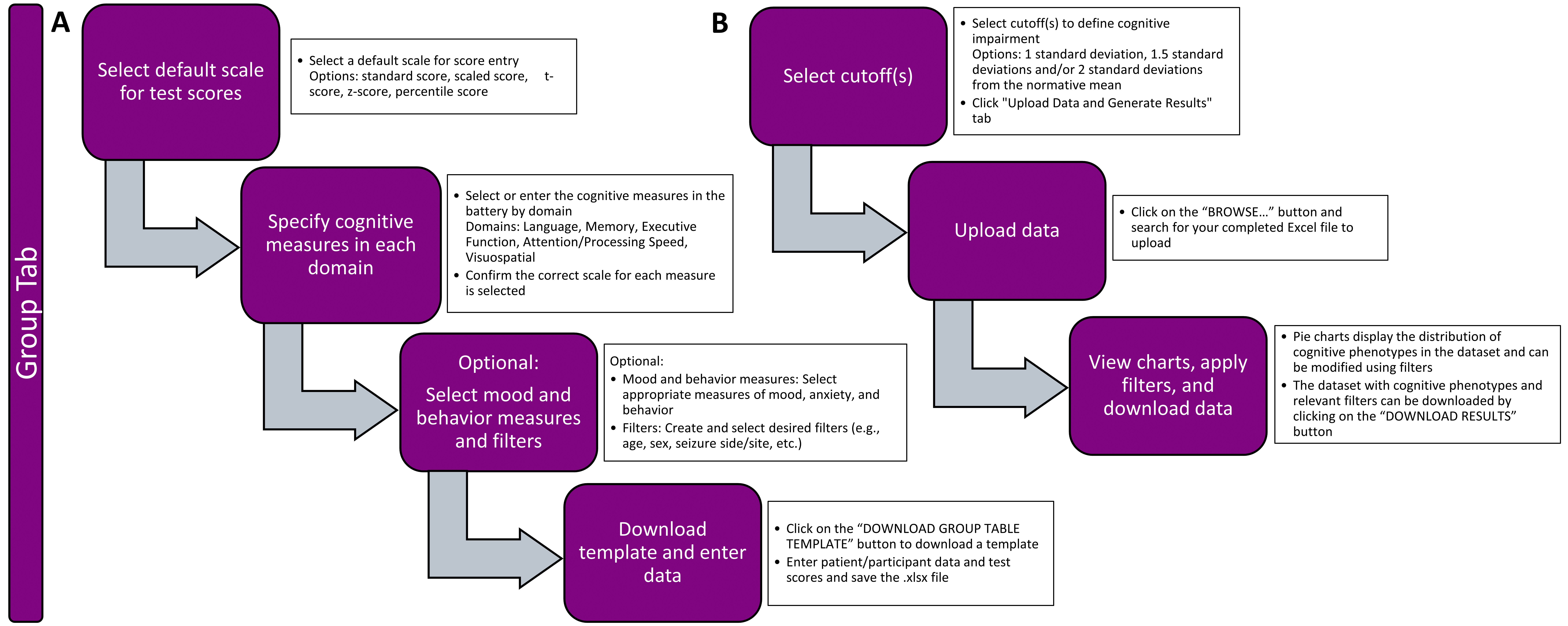
Step 1: Set Parameters
- Select the “Group” tab
-
Cutoff Selection: Choose 1, 1.5, and/or 2 SD below the normative mean to define cognitive impairment.
- Tip: Remove any others that you are not interested in using.
-
Default Score Scale: Choose from:
- Standard score, T-score, z-score, scaled score, or percentile.
- Note: This is only the default — you can change it per test.
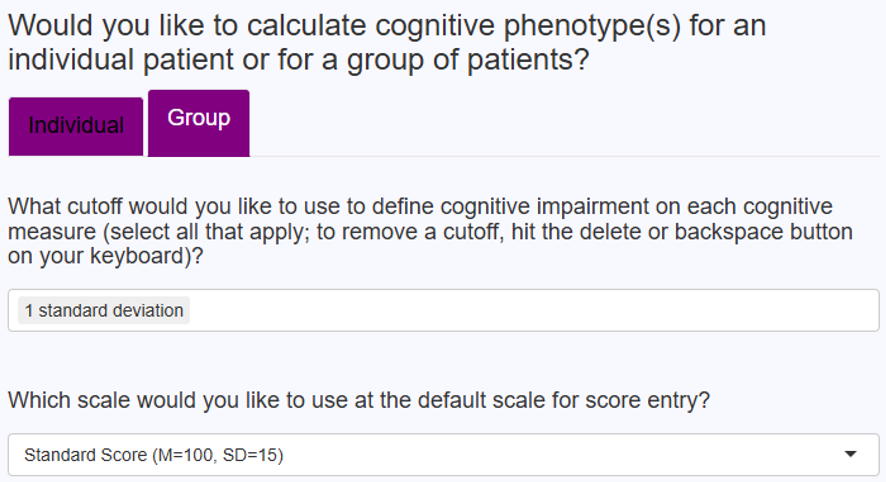
Step 2: Create Group Template
- Under the Group tab, click Create Template.
- As described above under the Individual Data instructions, for each cognitive domain:
- Select or enter all tests in your battery.
- Set the correct score scale (T-score, z-score, scaled score).
- Place a check in the “Include” box for all tests you want included in the cognitive phenotype generation.
- If your test is not listed, type it in.
- Include at least two tests per domain in at least four domains.
- Enter Filters (optional).
- Note: You can use any of the provided filters or enter other filters of your own (simply type over the existing filter names). Be sure to check the “Include” box for any filters you want included in your dataset.
- Once complete, click Download Group Table Template.
General Tip: It is recommended that users include tests of different types within a domain whenever possible (e.g., naming and fluency tasks rather than two fluency tasks in the Language domain).
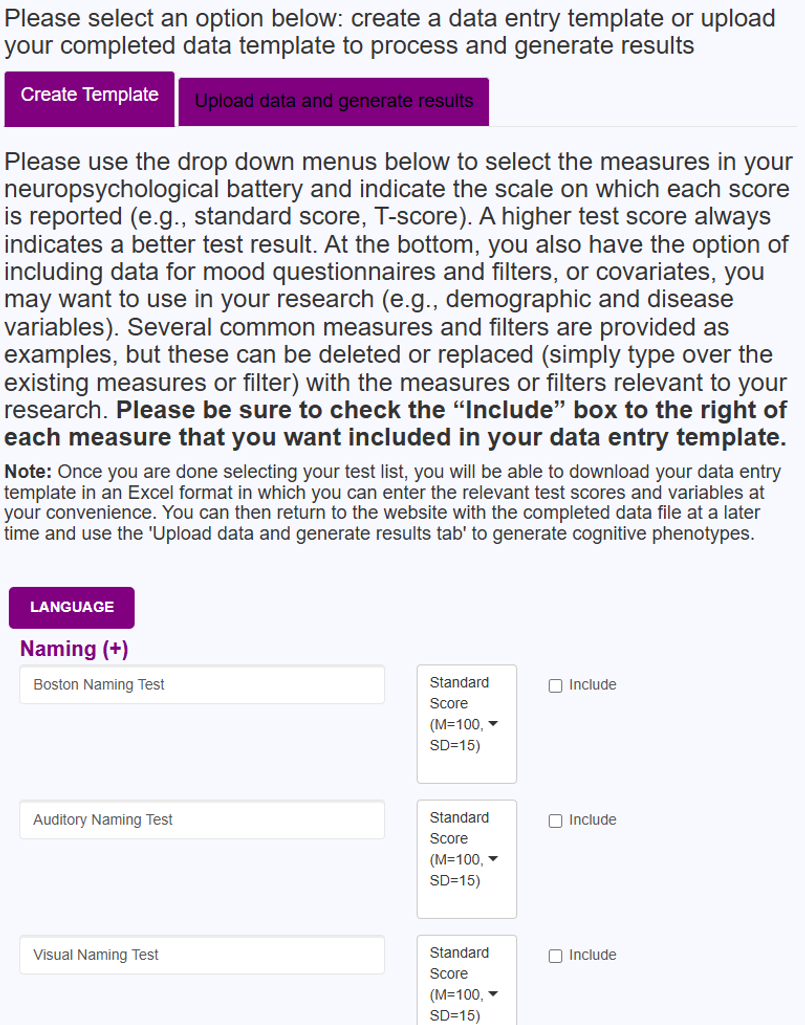
Step 3: Populate Template
- Open the downloaded spreadsheet file.
- Enter data:
- Each row = one participant.
- Each column = one test.
- Match scores to correct formats (e.g., scaled scores for WAIS subtests).
General Note: Do not modify the variable names in row 1 of the spreadsheet. These are required for the phenotype calculations to run correctly.
General Note: Some test scores entered may appear in RED font to indicate that a score may have been entered incorrectly or that the score entered may not match the scale selected for that score (e.g., standard score entered where there should be a scaled score). This is simply a prompt to check for errors; the calculator will still work if these warnings are present in a file uploaded to the calculator.
Step 4: Upload and Generate Results
- Return to IC Code Portal → Group tab.
- Click “Upload Data and Generate Results.”
- Use Browse to select your completed template file.
- Results will include:
- Display results presented as pie chart(s) showing IC Code phenotype distribution(s) — if you hover over the single domain or bi-domain slices, you can see a breakdown of impaired domains.
- Option to visualize pie charts by desired filters (e.g., sex, side of seizures).
- Option to download the results in a spreadsheet format.
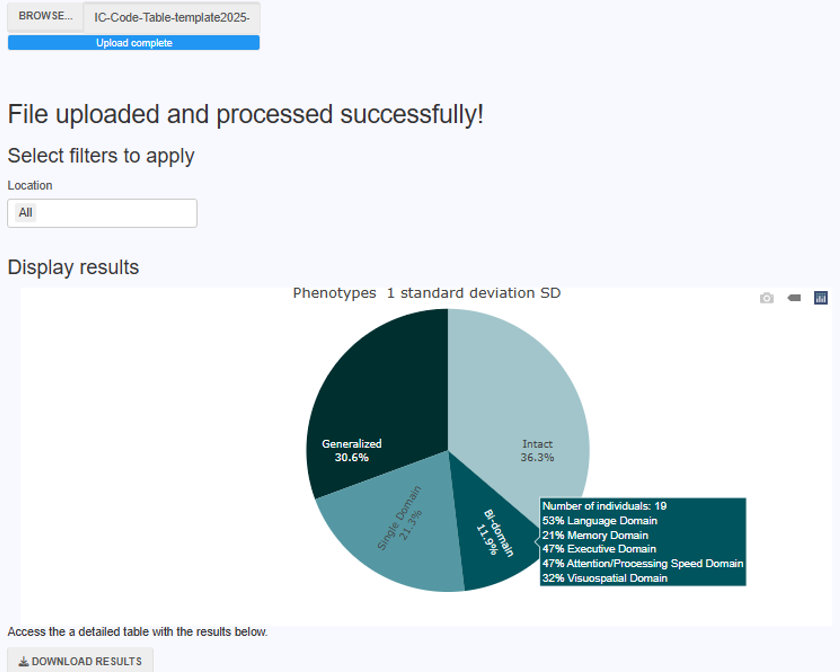
BEST PRACTICES
- Make sure scores and scales match correctly (e.g., T-score = 50 mean, z-score = 0 mean).
-
Double-check that:
- All included tests have scores (individual calculator) or that all included tests have the “Include” button checked (group calculator).
- All domains are sufficiently represented, ideally tapping into different constructs within the domain (e.g., fluency and naming for language).
- Be certain that there are at least two tests in at least four domains.
- Be sure that domains that are highly relevant for the patient group of interest (e.g., language and memory for temporal lobe epilepsy) are included.
Group Data Entry – Workflow Summary
Terms of Use
These Terms of Use (the 'Terms') govern your access to and use of websites, applications, and services (the 'Services') that are provided by The Cleveland Clinic Foundation ('Cleveland Clinic' or 'us' or 'we') and linked to these Terms. IF YOU DO NOT AGREE TO THESE TERMS, YOU MAY NOT USE THE SERVICES.
IC-CoDE Calculator
Please answer the series of questions below to customize the IC-CoDE calculator in the way that best suits your research. You have the option to select how many tests you would like to use in each cognitive domain to generate cognitive phenotypes; however, you must have a minimum of at least 2 tests per cognitive domain for the calculator to generate IC-CoDE phenotypes. It is recommended that you include tests of different types within each cognitive domain whenever possible (e.g., naming and fluency tasks rather than two fluency tasks). For detailed instructions on using the IC-CoDE calculator, please use the “Instructions” tab above.
Would you like to calculate cognitive phenotype(s) for an individual patient or for a group of patients?
Please use the drop down menus below to select the measures in your neuropsychological battery and indicate the scale on which each score is reported (e.g., standard score, T-score). A higher test score always indicates a better test result. Several common measures are provided as examples, but these can be deleted or replaced with the measures you have available by simply typing over the measure name. The calculator will generate an IC-CoDE phenotype using only the measures for which you enter a score. PLEASE NOTE: If data is entered and then the sub-category is closed (i.e., user clicks the (+) sign), the entered data will delete. So, users are encouraged to leave all test lists expanded until they have generated the cognitive phenotype.
Story/Prose Delayed Recall (+)
Word Pair Delayed Recall (+)
Design Delayed Recall (+)
When publishing manuscripts that make use of the IC-CoDE portal to generate phenotype data, we ask that you please include an acknowledgement. We recommend the following boilerplate language: IC-CoDE phenotype data were generated using the IC-CoDE Portal (IC-CoDE-Portal.ccf.org), which was funded by an American Epilepsy Society Infrastructure Grant (Award ID 1153665).
Please select an option below: create a data entry template or upload your completed data template to process and generate results
Please use the drop down menus below to select the measures in your neuropsychological battery and indicate the scale on which each score is reported (e.g., standard score, T-score). A higher test score always indicates a better test result. At the bottom, you also have the option of including data for mood questionnaires and filters, or covariates, you may want to use in your research (e.g., demographic and disease variables). Several common measures and filters are provided as examples, but these can be deleted or replaced (simply type over the existing measures or filter) with the measures or filters relevant to your research. Please be sure to check the “Include” box to the right of each measure that you want included in your data entry template.
Note: Once you are done selecting your test list, you will be able to download your data entry template in an Excel format in which you can enter the relevant test scores and variables at your convenience. You can then return to the website with the completed data file at a later time and use the 'Upload Data and Generate Results' tab to generate cognitive phenotypes.
Story/Prose Delayed Recall (+)
Word Pair Delayed Recall (+)
Design Delayed Recall (+)
Download your Excel data template (Note: The website does NOT save your Excel data template for future use, so please be sure to download and save it elsewhere until it is completed and ready to upload for analysis).
Download group table templateUpload completed Excel data template to generate IC-CoDE phenotypes.The website does not require any additional information to generate IC-CoDE phenotypes from a completed data template in which all scores have been entered. Once your Excel file has been uploaded, if the data loaded correctly, a blue bar will appear that says “Upload complete.” Please be patient as the system processes the data. Once the data are processed, you will receive a message saying, “File uploaded and processed successfully!” You can then scroll down to the bottom of the page and hit the “DOWNLOAD RESULTS” button to download the file with IC-CoDE phenotypes. If after uploading your data, the page turns a light gray, this indicates that something is wrong with the uploaded file, and the data cannot be processed. Please double check your file to correct any errors before uploading again.
When publishing manuscripts that make use of the IC-CoDE portal to generate phenotype data, we ask that you please include an acknowledgement. We recommend the following boilerplate language: IC-CoDE phenotype data were generated using the IC-CoDE Portal (IC-CoDE-Portal.ccf.org), which was funded by an American Epilepsy Society Infrastructure Grant (Award ID 1153665).
Epilepsy
- 2025
-
Ferguson et al.
Application of the International Classification of Cognitive Disorders in Epilepsy (IC-CoDE) to youths with drug-resistant epilepsy
- 2025
-
Almane et al.
Application of the International Classification of Cognitive Disorders in Epilepsy (IC-CoDE) to youths with new and recent onset epilepsies
- 2024
-
Miron et al.
Cortical Thickness Patterns of Cognitive Impairment Phenotypes in Drug-ResistantTemporal Lobe Epilepsy
- 2024
-
Arrotta et al.
Polygenic burden and its association with baseline cognitive function and postoperative cognitive outcome in temporal lobe epilepsy
- 2024
-
Reyes et al.
Validity of the MoCA as a cognitive screening tool in epilepsy: Are there implications for global care and research?
- 2024
-
Hermann et al.
A user's guide for the International Classification of Cognitive Disorders in Epilepsy
- 2024
-
Shah et al.
Cross-cultural application of the international classification of cognitive disorders in epilepsy cognitive phenotypes in people with temporal lobe epilepsy in India
- 2023
-
Busch et al.
Association of neighborhood deprivation with cognitive and mood outcomes in adults with pharmacoresistant temporal lobe epilepsy.
- 2023
-
Bingaman et al.
The relationship between mood and anxiety and cognitive phenotypes in adults with pharmacoresistant temporal lobe epilepsy.
- 2023
-
Reyes et al.
Establishing the cross-cultural applicability of a harmonized approach to cognitive diagnostics in epilepsy: Initials results of the IC-CoDE in a Spanish-speaking sample.
- 2023
-
Arrotta et al.
Application of the International Classification of Cognitive Disorders in Epilepsy (IC-CoDE) to frontal lobe epilepsy using multi-center data.
- 2023
-
McDonald et al.
Development and application of the International Classification of Cognitive Disorders in Epilepsy (IC-CoDE): Initial results from a multi-center study of adults with temporal lobe epilepsy.
- 2021
-
Norman et al.
Addressing neuropsychological diagnostics in adults with epilepsy: Introducing the International Classification of Cognitive Disorder in Epilepsy: The IC-Code Initiative.
Other Disorders
- 2025
-
Sousa et al.
Longitudinal Study of Cognitive Phenotypes in Patients with Relapsing-Remitting Multiple Sclerosis
- 2025
-
Sousa et al.
Cognitive phenotypes in patients with relapsing-remitting multiple sclerosis with different disease duration, applying the international classification of cognitive disorders in MS (IC-CoDiMS)
- 2024
-
Delgado-Alonso et al.
Cognitive profile in multiple sclerosis and post-COVID condition: a comparative study using a unified taxonomy
- 2024
-
Delgado-´Alvarez et al.
European cross-cultural neuropsychological test battery (CNTB) for the assessment of cognitive impairment in multiple sclerosis: Cognitive phenotyping and classification supported by machine learning techniques
- 2023
-
Matias-Guiu et al.
Development of criteria for cognitive dysfunction in post-COVID syndrome: the IC-CoDi-COVID approach.
- 2023
-
Hancock et al.
A proposed new taxonomy of cognitive phenotypes in multiple sclerosis: The International Classification of Cognitive Disorders in MS (IC-CoDiMS).
- 2024
-
Terman et al.
Hiding in plain sight – Neighborhood versus individual determinants of psychological outcomes in patients with epilepsy.
- 2024
-
Physiciansweekly
Depression associated with worse cognitive phenotype in temporal lobe epilepsy.
- 2023
-
Widdess-Walsh et al.
Breaking the CoDE of cognitive disorders in epilepsy.
- 2023
-
American Academy of Neurology
For people with epilepsy, neighborhood may be tied to memory, mental health.
- 2023
-
Kobau et al.
The importance of understanding neighborhood environments in neurology care.
- 2023
-
Sarkis et al.
Update in progress: Cognitive phenotypes in temporal lobe epilepsy.
The International Classification of Cognitive Disorders in Epilepsy (IC-CoDE)
The IC-CoDE represents a consensus-based, empirically-driven approach to diagnosing cognitive disorders in adults with epilepsy. It was developed in 2020 through a memorandum of understanding (MOU) between the International League Against Epilepsy (ILAE) Neuropsychology Task force and the International Neuropsychological Society (INS). The main goal of the IC-CoDE is to accelerate global research in the neuropsychology of epilepsy by providing an internationally-applicable framework for cognitive diagnostics in epilepsy with clear operational criteria and established impairment cut-offs. The IC-CoDE was developed as a guide for harmonizing multi-site cognitive research in epilepsy. It has not been validated as a diagnostic tool for individual patients in clinical settings.
The IC-CoDE framework was originally tested in a large, multicenter cohort of 2,485 adults with temporal lobe epilepsy and subsequently in a multicenter cohort of 455 with frontal lobe epilepsy. The IC-CoDE is now currently being tested in youth with epilepsy and in adults at international sites. IC-CoDE has not yet been applied to other epilepsy syndromes (e.g., juvenile myoclonic epilepsy, absence seizures). IC-CoDE has also been modified and applied to several other disorders outside of epilepsy (e.g., multiple sclerosis, COVID-19). A list of published studies that have used IC-CoDE is provided under the Publications tab above.
Initial Considerations for IC-CoDE Users
The goal of the IC-CoDE is to apply the cognitive model (Figure 1) using the operational definitions provided in order to arrive at a diagnostic cognitive phenotype (Figure 2). Step-by-step instructions for using the IC-CoDE calculator are provided below. For more information refer to Norman et al., 2021, Epilepsia, McDonald et al., 2023, Neuropsychology, and Hermann et al., 2024, Epileptic Disorders.
Funding
Funding for development of the IC-CoDE Portal was provided by an American Epilepsy Society Infrastructure Award (Award ID 1153665).
Privacy policy